
MCP for ecommerce: Five shop tasks you can just ask AI to do
How are we doing? What is broken? What should we do next? Now you can just ask.
Connect the Hello Retail MCP server to Claude or ChatGPT and you get the answer, and the fix, in the same conversation. Our Fall Release 2026 webinar showed five shop tasks you can hand to an AI assistant today. Here is the reading version.
Webinar · AI for ecommerce. You can just ask.40 min

Jump to a moment in the video:
- 0:31 Introduction
- 1:55 What is MCP?
- 4:26 Automating performance reports
- 10:45 Scheduling tasks and connecting other tools
- 14:01 Fixing zero-result searches with synonyms
- 20:21 Picking newsletter products with Product Intelligence
- 25:13 Changing your search design in plain English
- 34:40 Live Q&A
What is MCP, and how is it different from an API?
MCP stands for Model Context Protocol. It is an open standard that lets an AI assistant use another system’s tools. A product makes its tools available through an MCP server, and your assistant connects to it. Take a simple example: To change your search synonyms today, you log into Hello Retail and click through the interface. The Hello Retail MCP server gives an AI assistant an efficient way to do the same job, and it comes with instructions that teach the assistant how to use each tool.
So does the MCP server replace the API? No. They expose similar things, but they serve different people.
“The [MCP server] should be more seen as a UI, but for the agent,” explains Jacob. The API is for developers building software that talks to other software.
In practice, the MCP server is the obvious choice when you want to automate your own work with your own assistant, like Claude or ChatGPT. The Hello Retail MCP server has about 160 MCP tools so far. Many people think of MCP as a way to pull data out for analysis. The Hello Retail MCP server also lets you change things, like adding synonyms or editing a design.
Before you start, one safety principle runs through everything below. Every MCP tool that edits something asks for your permission first, and in most cases it creates a draft that you publish yourself.
How to automate your monthly performance report
A monthly performance report usually means visiting several places, collecting data points and stitching them into one document. In Claude, it takes one prompt:
Please create a performance report for the months August and September, separating out numbers for Search, Recommendations, Pages, and Product Agents.
The last part matters. Asking for each solution separately makes the report split revenue and traffic clearly, even where several solutions were involved in the same sale.
A few minutes later, the report is ready. In the demo, it showed that September beat August across every solution, broke search down into the top searches and how they developed, and showed where shoppers went after interacting with each solution. It also ended with a list of what to do next. The first item: Fix the 10 dead-end searches it had found.
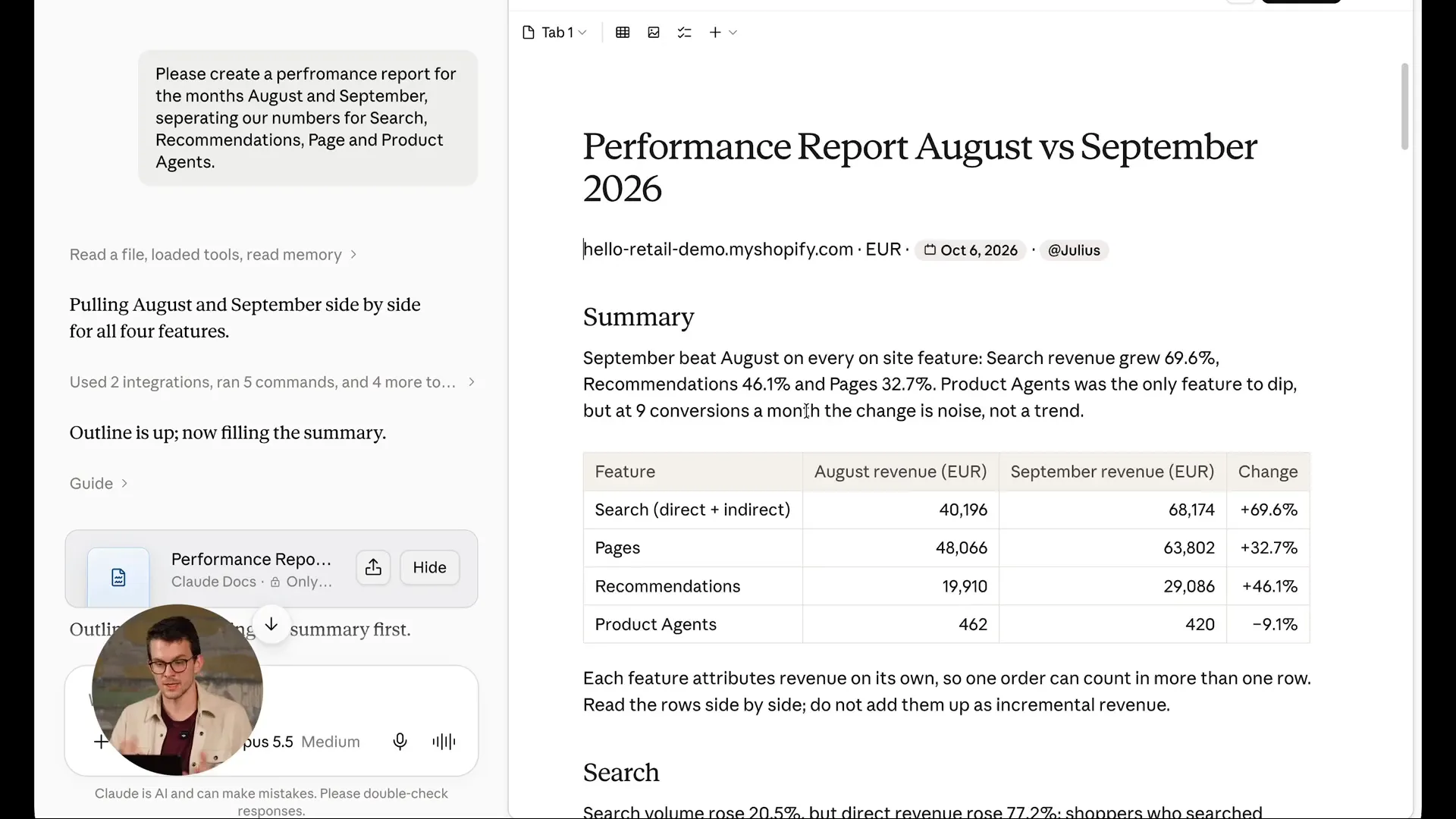 The finished report in Claude: Revenue for each solution, month against month. Watch from 9:45
Tip: A report like this takes a little while to build. You can run several chats at once, so start the next question while you wait.
How to put the report on a schedule
A report you have to ask for is still a task on your list. So take the same prompt, create a scheduled task in Claude Cowork and add one line:
Please run this report every first of the month for the two previous months.
The scheduled task fills in the right months each time it runs. After a one-time approval of the permissions it needs, the report arrives on the first of every month without anyone asking. You can do the same in ChatGPT.
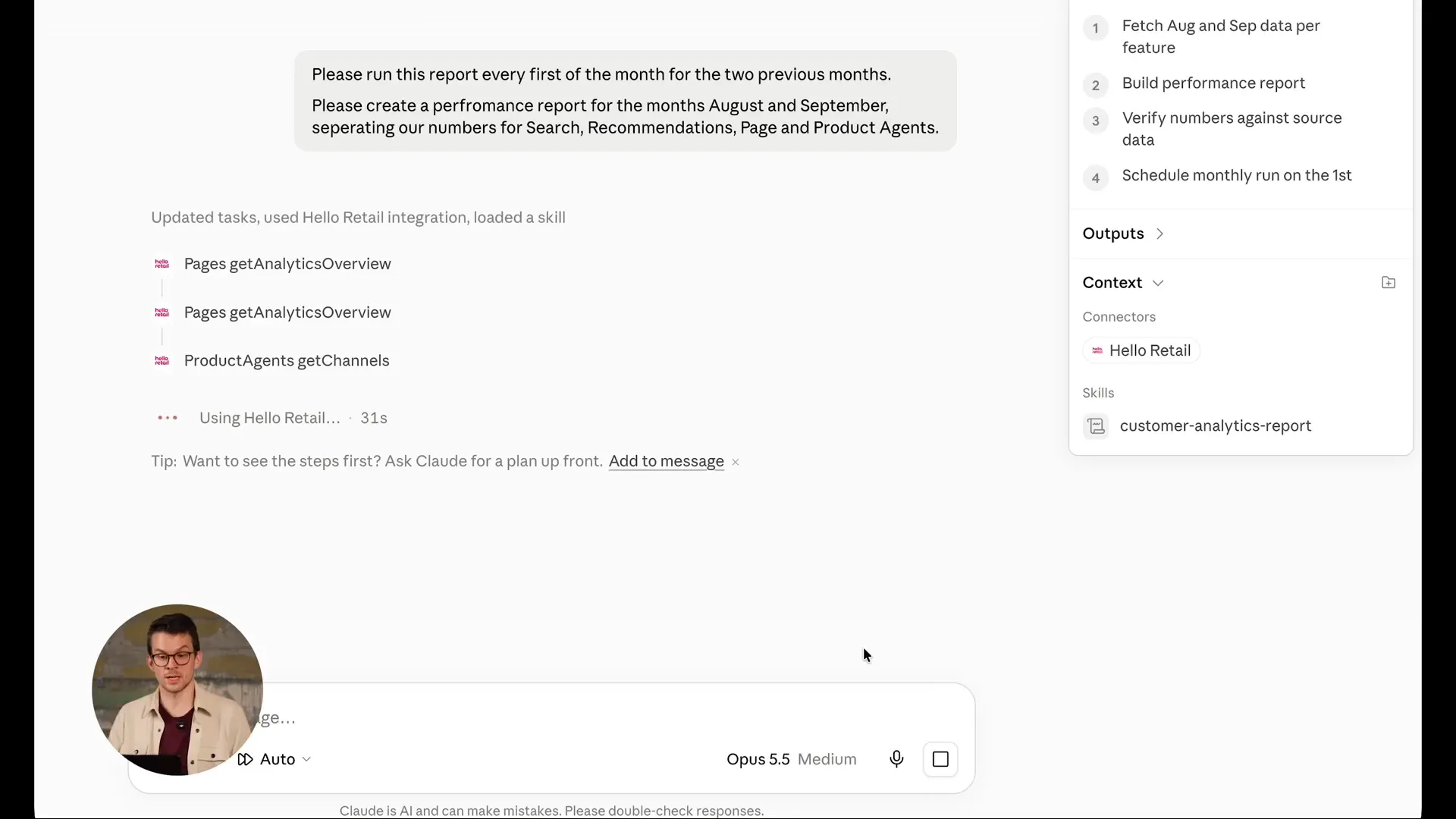 Turning the report into a scheduled task in Claude Cowork. Watch from 11:55
Connect it to the rest of your tools
The bigger opportunity is that other platforms have MCP servers too. When one AI assistant is connected to several of them, it can combine them. You could pull numbers from your analytics tool and use them to change settings in Hello Retail.
Take Black Friday: Use the Shopify MCP server to lower prices on a set of products and, in the same request, boost those products in your search. One request, work done in two systems.
How to fix zero-result searches with synonyms
A shopper who searches and finds nothing usually leaves. Sometimes the word is misspelled, sometimes it is in another language. Ask:
Please show me all searches that came out with zero results, and tell me where it would make sense to create synonyms for things that we actually sell.
The answer listed the zero-result searches with synonym candidates for each, and it flagged a few candidates that were not a good fit. It then asked whether to add the nine synonyms it proposed. One yes and one approval later, the assistant had added 11 synonym entries across those nine searches. They reach shoppers after the next re-index of the shop’s data.
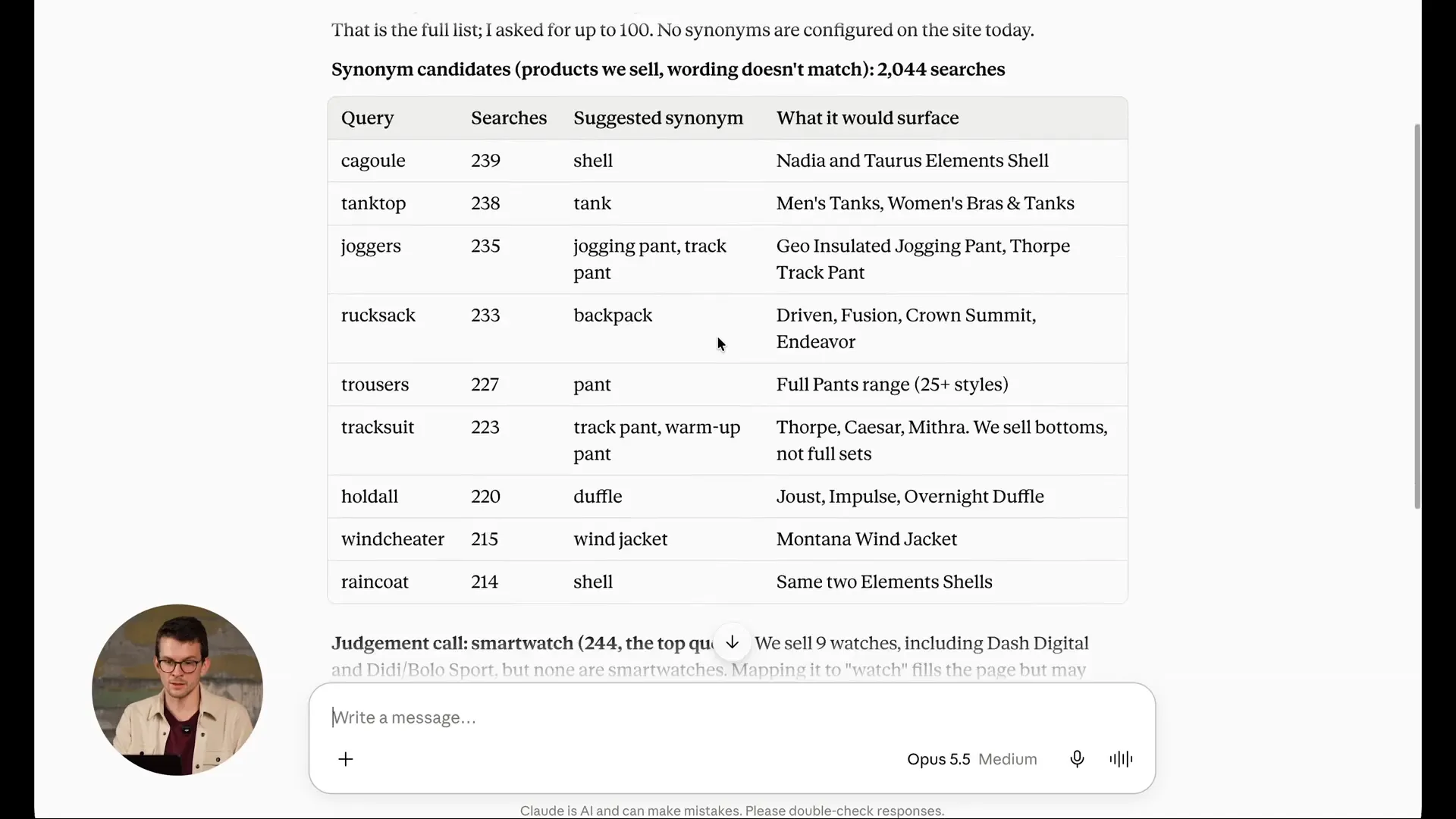 Synonym suggestions for searches that found nothing. Nothing changes until you say yes. Watch from 17:10
This flips how the work gets done: The AI does the first draft and you check the quality before it ships. As Julius put it:
“[MCP tools] don’t necessarily replace the human here. What they do is that they help you analyze a few things that you might not have spotted otherwise.”
It is also a conversation. If a suggestion looks odd, ask why the assistant proposed it before you accept. And if you run several stores, you can work on all of them in the same session, for example to add synonyms in each language you sell in.
Try it as a routine: Schedule this prompt for Monday morning, so the suggestions are waiting for you to review and accept.
How to pick newsletter products with Product Intelligence
Product Intelligence is Hello Retail’s analysis of your catalog. When your products are indexed, Hello Retail works out what type each product is and what it goes well with. It also learns properties such as which day of the week a product sells best, and whether lowering its price would actually sell more.
Say you have space for a few more products in your Q4 newsletter. Ask:
I am currently working on our Q4 newsletter. Please show me a few of my products that would work well in this newsletter based on their Product Intelligence data.
The answer listed products by their share of yearly sales that falls in Q4. Here is how to read it: A product that sells evenly all year sells 25% in each quarter. Anything clearly above 25% in Q4 is a strong pick for a Q4 newsletter.
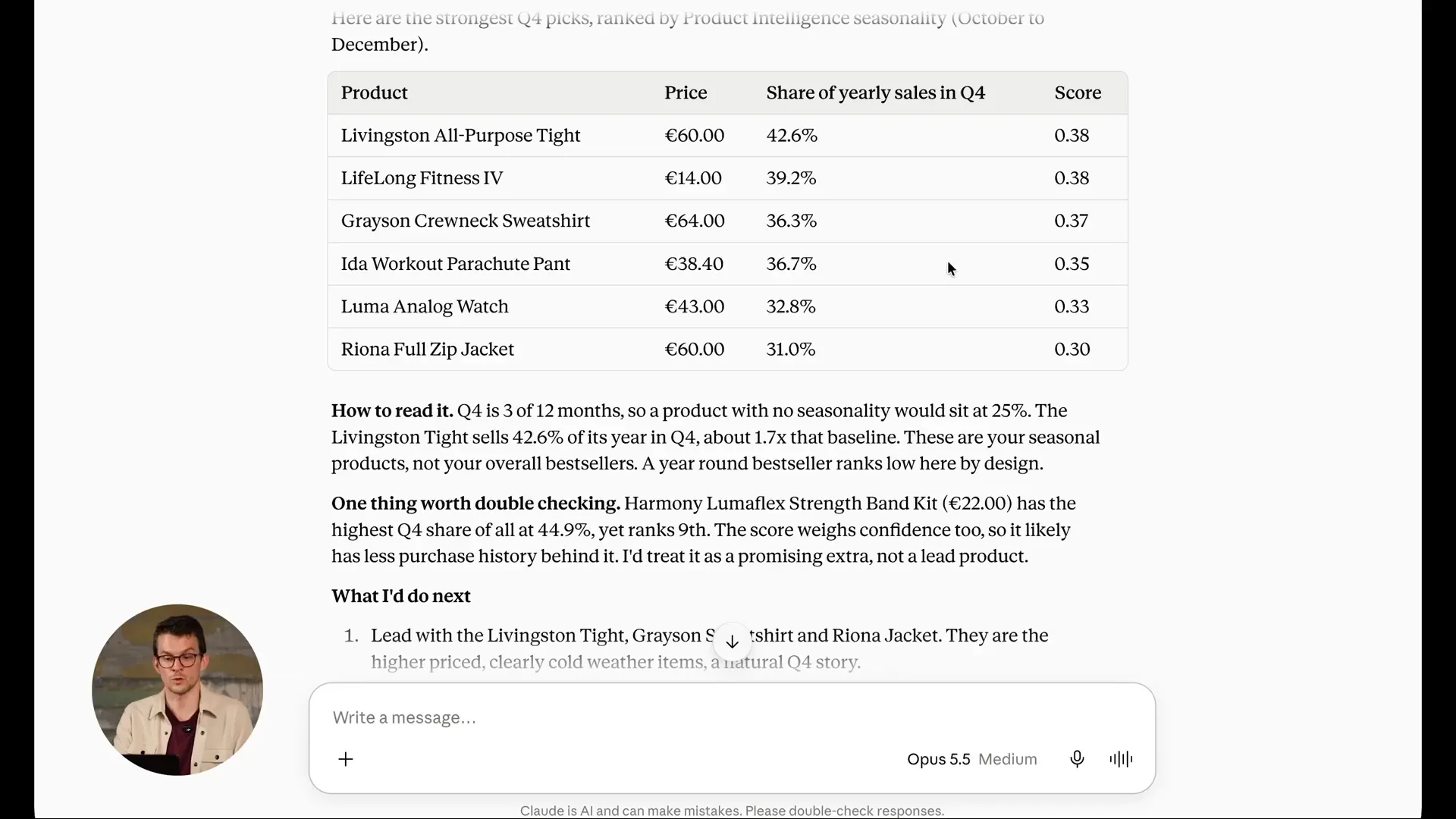 Products ranked by how much of their yearly sales fall in Q4. Watch from 23:40
If you use Newsletter Content, you can continue the same chat and ask it to create a new campaign with those products. And if your assistant is also connected to other MCP servers, you could ask it to build the campaign in Klaviyo, or ask which products sell well with a discount and lower their price in Shopify.
Looking for more ideas like this? The developer documentation has example prompts for each MCP tool that you can try on your own shop.
How to change your search design in plain English
Seasonal design changes used to mean editing template code. Now it takes a request. Here is a demo store getting ready for Halloween:
Let’s adjust our search template to reflect our Halloween campaign.
Add the address of your campaign page and of a small campaign graphic, and ask for the graphic in the corner of the search results, linked to the campaign page.
The assistant read the template, made the change and saved it as a draft. Because the store runs on Hello Retail’s managed setup, the draft can be previewed on the live site without customers seeing it. The graphic sat in the corner and clicking it opened the Halloween sale page. A second request turned the sale badge pumpkin orange and moved it to the other side of the product tile.
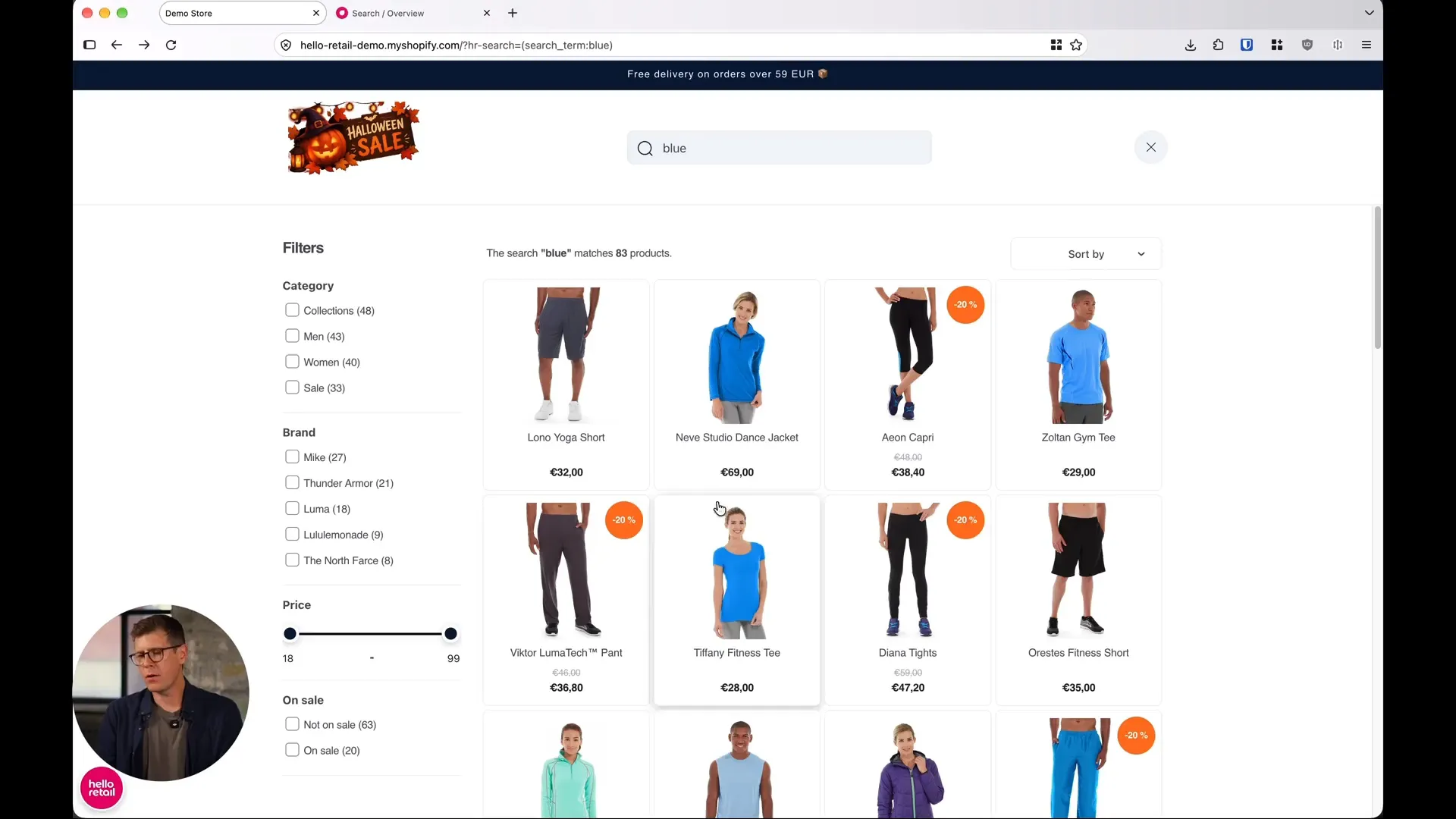 The search draft after two plain English requests: A Halloween graphic linked to the sale page, and orange sale badges. Watch from 33:05
“It is just plain English explaining to the agent what visual change I would like to see,” says Jacob.
The same workflow works for recommendations and Pages. The assistant knows HTML and JavaScript and has instructions for how Hello Retail works, so, in Jacob’s words, it “really allows someone who is not a developer to do the type of changes that would have required a developer previously.”
Put the pieces together and a whole seasonal campaign fits in one chat: Ask Product Intelligence what sells well around Halloween with a 10 to 20% discount, lower those prices in your shop platform, boost the products in search and give the sale badge a seasonal look.
Questions from the live Q&A
Who can use the Hello Retail MCP server, and what does it cost? At the time of the webinar, it was in beta and available to everyone with a paid Hello Retail account, whichever products they use, free of charge. It gives the assistant access to the products and data your account already has.
Does the AI model make a difference? The tools work the same with any model, but what the assistant concludes from your data depends on the model. For analysis it can be worth paying for a larger model. For bulk updates, a smaller model does the job and is usually faster and cheaper.
Does it work with several domains? Yes. Name the domain you want to work on, for example myshop.se or myshop.dk. Hello Retail’s own delivery team already uses it to copy setups between domains.
Does it work in Microsoft Copilot? Not at the time of the webinar. The team was working on support.
What if the assistant makes a change I don’t want? Three things protect you. MCP tools ask before they change anything. Changes to things like a search design land in a draft, a copy of your live setup that you can discard to start over, while customers keep seeing the live version. And the audit log records every change made through the MCP server, so you can see what changed and revert it.
Key takeaways
- Ask, then act. The Hello Retail MCP server lets Claude or ChatGPT read your data and make changes, so a report and the fixes it suggests can happen in one conversation.
- Schedule the routine work. Reports and checks like zero-result searches can run on a schedule and wait for your review.
- You stay in control. The assistant asks before it changes anything, design changes land in a draft, and the activity log shows every change.
- Combine systems. With other MCP servers connected, one request can update prices in your shop platform and boosts in Hello Retail.
- No developer needed for many changes. Seasonal design tweaks are a plain English request.
How to get started
Your AI assistant connects to the Hello Retail MCP server with a sign-in to your Hello Retail account the first time you use it, so there are no keys to copy around. Setup guides for Claude, ChatGPT and OpenAI Codex are in the developer documentation. For the full release, visit the Fall Release 2026 page, and if you are new to the topic, read what MCP means for ecommerce and how MCP compares to an API.
Not a Hello Retail customer yet? Book a demo and we’ll show you what you can ask about your own shop.
Meet the speakers
This article is based on our Fall Release 2026 webinar, “AI for ecommerce. You can just ask.”

Philip Andersen
Chief Product Officer
Chief Product & Technology Officer at Hello Retail, driving product innovation and development. With over a decade of experience scaling SaaS businesses, Philip brings proven expertise in strategy, technology, and building customer-centric solutions.

Julius Altenburger
Senior Product Manager
Julius brings a strong focus on personalization, data-driven decision making, and building experiences that keep customers coming back, so retailers can offer a shopping experience that feels tailored to each customer without any extra work on their end.

Jacob Oettinger
Software Architect
With more than 10 years at Hello Retail, Jacob has played a key role in shaping many of the products we have today. He is an experienced software developer and architect, with deep expertise in agentic development.
Keep reading
 Industry Tips
Why your bestsellers are killing your profits
Your top 20% of products get all the attention. The other 80% sit there like wallpaper. Here's why the fringe of your catalog is where the margin lives.
 Search
Fast site search: Why milliseconds matter in ecommerce
Shoppers who search already know what they want. Here is what the research says about speed and sales, and what faster search results mean for your store.
