Retail Media: Target banners by hierarchy or brand
Hierarchy paths and brands can now be picked as the relevancy source for a Banner, sitting alongside the existing Products option in the campaign editor. Existing cluster-based banners keep working, with nothing to migrate and nothing to reconfigure.
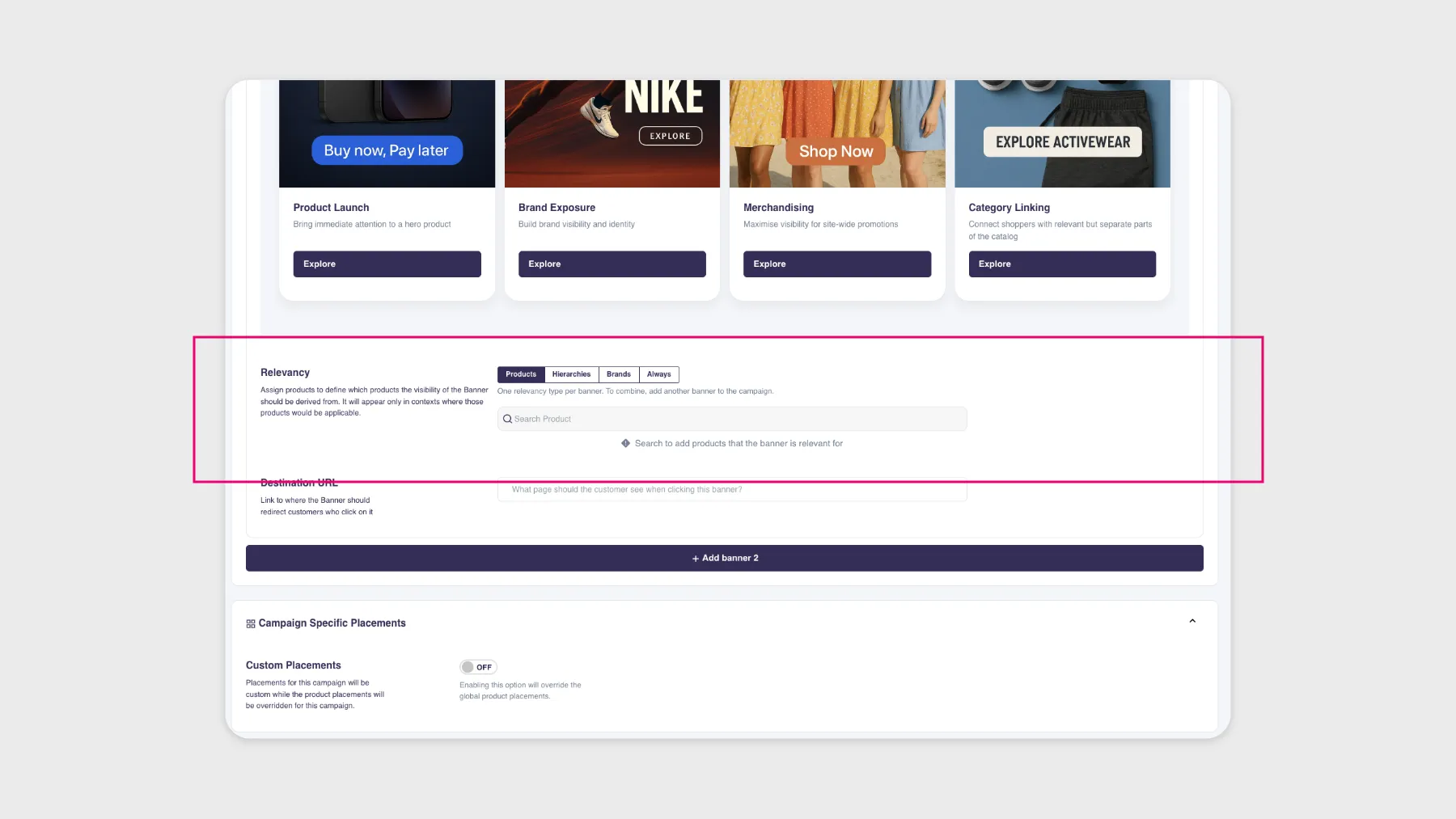
Now you can pick hierarchy paths or brands as the relevancy source for your Banners, sitting right alongside the existing Products option in the campaign editor.
How the three sources work
All three work the same way: search field up top, your selected items listed below with a delete icon on each. Pick a hierarchy path and the banner becomes eligible wherever products from that category show up. Same logic for brands. You get full catalog depth too, so you’re not stuck with whatever coarse cluster happens to be attached to your products.
Nothing changes about relevancy
Nothing changes about how relevancy is evaluated. The existing logic is untouched, only the input feeding it changes. Your current cluster-based banners keep working exactly as they are, with nothing to migrate and nothing to reconfigure.
One relevancy type per banner
It’s still one relevancy type per banner. Products, Hierarchies, Brands and Always are mutually exclusive. If you want to combine two conditions (a hierarchy and a brand, say), add a second banner to the campaign.
