
Search word boosting: Granular control over your search results
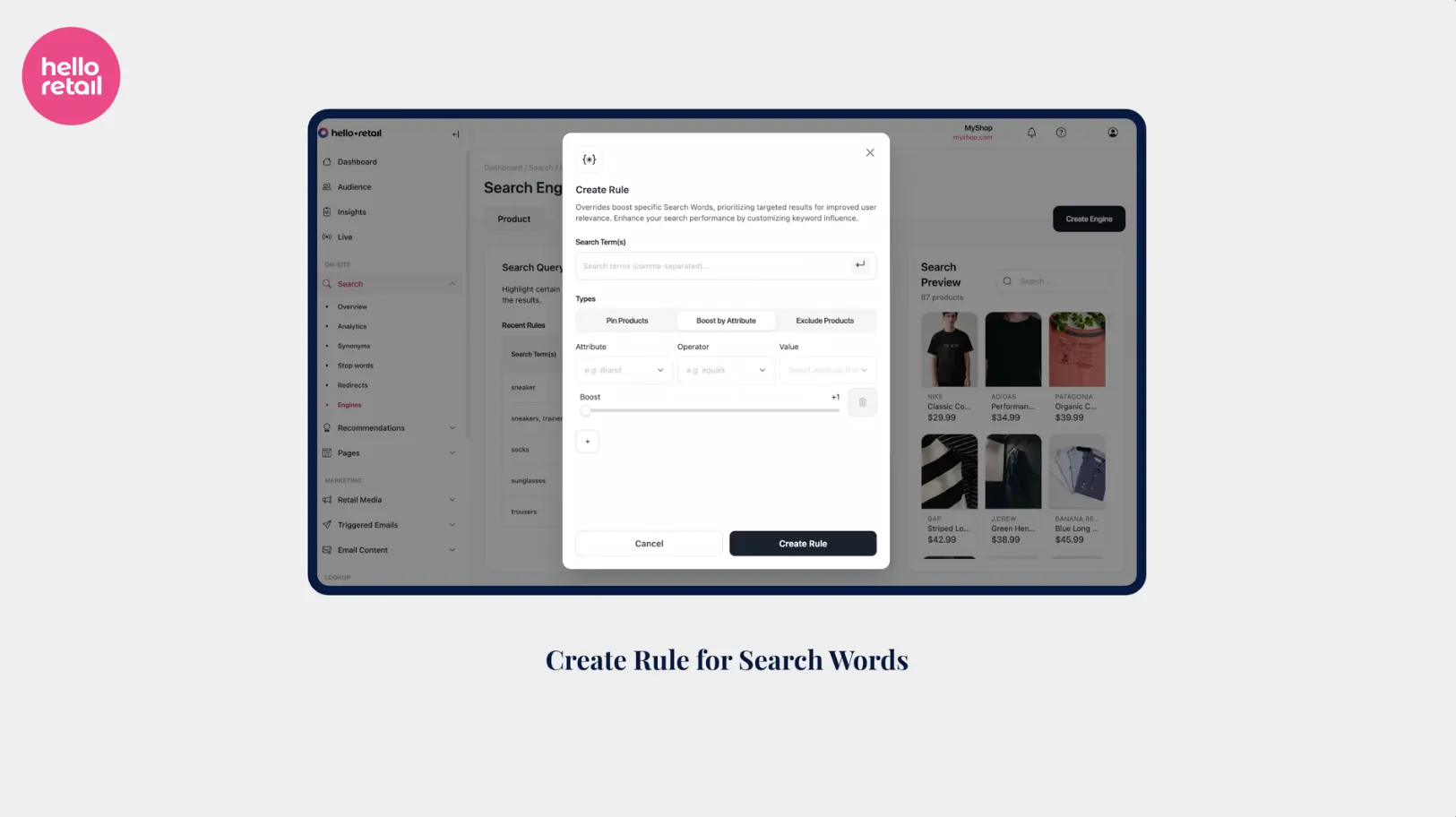
Search word boosting is a Hello Retail Search feature that lets merchants define precise rules for individual search terms - pinning specific products to the top of results, boosting entire brand or attribute groups, or deprioritizing products that are poor fits. The result is a search experience shaped by both algorithmic relevance and the merchant’s strategic intent, without touching any underlying configuration.
What search word boosting changes
Hello Retail Search personalizes results automatically, ranking products based on shopper behavior and merchant-tunable signals. But that handles the general case. Every merchant eventually hits the edge cases: a seasonal campaign where one brand needs to lead, a popular product sitting at a single size in stock and converting poorly, or an ingredient name that keeps pulling the wrong category to the top.
For these moments, blanket configuration settings are not precise enough. Search word boosting adds a per-term rules layer on top of the algorithmic base, so merchants and ecommerce managers can pin products, boost by attribute, and suppress results - all scoped to exactly one search term or a defined group of related terms.
Three things you can do that weren’t possible before
The core capability is deceptively simple, but the use cases open up fast. Three actions are now available inside the Hello Retail dashboard under Search Engine Settings > Search Query Rules:
- Pin a specific product: Set a rule for a search term (“t-shirt”, “tshirt”, “t”) and designate a product as pinned. It locks to position one regardless of algorithmic ranking.
- Boost by attribute: Tell the engine that whenever “sneaker” is searched, products where the brand attribute equals Nike should rank higher than competing brands. The result set reshuffles to reflect that priority.
- Deprioritize by fit: Surface a product less prominently for a term where it technically matches but practically converts poorly - a line with poor stock depth, an off-season style, or a product that keeps attracting returns.
These three levers cover most of the scenarios customers have historically had to work around.
Where search word boosting makes the most commercial sense
Four application areas emerge clearly from the customer conversations that shaped this feature.
Ingredient or component searches. Some products are searched by what’s inside them - a cosmetics store might see “hyaluronic acid” hit the search bar regularly. If a particular serum leads on that ingredient and performs well commercially, a rule can lock it to the top for that term without any broader engine reconfiguration.
Seasonal and promotional campaigns. Time-limited promotions need front-of-results placement for a specific product group. A rule scoped to the campaign’s search terms accomplishes exactly that, and can be removed just as easily when the promotion ends. No permanent setting changes, no cleanup overhead.
Stock and conversion management. A product with one size in stock and a poor conversion rate should not sit at position one on its category search term. Boosting products with healthy stock depth and broad size availability directly improves the conversion outcome for high-intent shoppers landing on those results.
The limits of algorithmic relevance
A well-tuned search algorithm handles the vast middle of queries well. It surfaces relevant products, accounts for behavior signals, and ranks by conversion probability. But algorithms optimize for the average case. They don’t know about this week’s campaign, last Tuesday’s stock depletion, or the brand that just renewed its partnership at a higher tier.
Baymard Institute’s ecommerce search research finds that roughly 43% of major ecommerce sites offer a notably poor search experience, costing them measurable revenue from high-intent visitors. Shoppers who type into a search bar are already further along in the purchase journey than those who browse. Losing them at the results page is an expensive conversion failure.
Salesforce’s State of Commerce report finds that 56% of consumers say they are more likely to make a repeat purchase from a retailer that personalizes the experience. Search results that reflect a merchant’s actual commercial priorities - current campaigns, stocked products, retail media commitments - are a direct form of that personalization.
The gap between a good-enough algorithm and a strategically controlled search results page is exactly what search word boosting is designed to close.
Getting started: A practical first step
Start with your top searches. Pull the most frequent search terms from your analytics dashboard, then look at the results those terms are currently surfacing. Ask whether the top result is actually the best commercial outcome - the right margin profile, adequate stock depth, the product that belongs in an active campaign.
If the answer is no, create a rule. The workflow in the Hello Retail dashboard is straightforward: open Search Engine Settings, navigate to Search Query Rules, and click Create Rule. Add the search term and any synonymous variants as a single rule group (the demo uses “t-shirt,” “tshirt,” and “t” together), then either pin a product directly or set an attribute boost. Changes take effect immediately, and rules can be deactivated or deleted without affecting any other search configuration.
For merchants preparing for peak periods - summer sales, back-to-school, Black Friday - building out search word boosting rules in advance, scoped to the seasonal search terms that will dominate, gives direct control over what a high-intent shopper sees when traffic is at its highest.
Search word boosting is available to all Hello Retail customers on a Search plan.
Keep reading
Solutions Search word boosting: Granular control over your search results
Search word boosting lets Hello Retail merchants pin products, boost brand attributes, and deprioritize poor-fit results for any individual search term.
 Solutions
 Initial content in search: Advanced personalization at the zero-query moment
Initial content in search shows personalized product suggestions the instant a shopper clicks the search bar, before they type a character, now with per-shopper algorithm control.
 Solutions
 Recommendations: Pinning and excluding products for curated results
Hello Retail's Product Recommendations lets merchants pin products to bought-together and alternatives slots, and blacklist products that should never appear as pairs.