# Introducing the New Arrivals agent

> The New Arrivals agent emails your new products to the shoppers most likely to care: People who recently viewed something similar, or bought something the new product goes with. No segments, no campaigns.

**Author:** Ecaterina Capatina
**Published:** November 18, 2026
**Tags:** product-agents, new-arrivals, email-automation, personalization, ecommerce

---

Put your new products in front of the shoppers most likely to buy them, without building a single segment or campaign. The **New Arrivals agent**, the newest of the [Product Agents](/en/product-agents/), finds the people who recently viewed something similar, or bought something the new product goes with, and sends each of them one email with 2 to 4 new products picked for them.

> **Available now.** New Arrivals is generally available to all customers who use Product Agents.

## What it does

**The New Arrivals agent emails your shoppers about new products they are likely to want.** When you add new products to your shop, the agent picks out the shoppers who have shown interest in something similar and sends each of them one email with the new products that suit them.

You do not need to build a segment or set up a campaign. Once you switch it on, it runs by itself and sends through your Klaviyo account, or through a webhook if you use another email tool.

<div class="-mx-4 md:-mx-8">

</div>

## How it works

The agent works in three steps.

1. **Spot new products.** Once a day, the agent collects the products you have added. Instead of sending for every single product, it waits for a worthwhile batch: 6 new products, or at least 2 that have waited 10 days. Sizes and colours of one product count as one, so a shirt in six sizes is one new product.
2. **Find the right shoppers.** For each new product, the agent looks for shoppers who viewed a similar product in the last 30 days, or bought a product that goes with it in the last 180 days.
3. **Send one email.** Each shopper gets a single email with the 2 to 4 new products that fit them best, spread across product types. The text is written by AI in your shop's language and tone of voice. No spamming, with a maximum of one email per week, per customer.

![A shopper who bought pleated chinos and viewed a striped Oxford shirt. From the shop's new inventory, the New Arrivals agent picks a linen overshirt and a leather sneaker and sends them in one email.](/images/blog/2026-11-18-new-arrivals-product-agent/new-arrivals-email-example.webp)

## Built to stay welcome

A new-arrivals email only works if shoppers are glad to get it. The agent is built around that:

<div class="hr-card not-prose my-8 !py-2">
  <div class="hidden md:grid md:grid-cols-[2fr_3fr] gap-8 py-3 border-b border-[color:var(--hr-line)]">
    <div class="hr-label">Rule</div>
    <div class="hr-label">What it means for you</div>
  </div>
  <div class="grid gap-1 md:grid-cols-[2fr_3fr] md:gap-8 py-4 border-b border-[color:var(--hr-line)]">
    <div class="font-semibold text-[16px] leading-snug text-[color:var(--hr-deep-sea)]">At most once a week per shop</div>
    <div class="text-[15px] leading-relaxed text-[color:var(--hr-ink-2)]">Your list is never flooded with new-arrival emails</div>
  </div>
  <div class="grid gap-1 md:grid-cols-[2fr_3fr] md:gap-8 py-4 border-b border-[color:var(--hr-line)]">
    <div class="font-semibold text-[16px] leading-snug text-[color:var(--hr-deep-sea)]">One New Arrivals email per shopper per week</div>
    <div class="text-[15px] leading-relaxed text-[color:var(--hr-ink-2)]">Plus up to two follow-ups, if you allow them</div>
  </div>
  <div class="grid gap-1 md:grid-cols-[2fr_3fr] md:gap-8 py-4 border-b border-[color:var(--hr-line)]">
    <div class="font-semibold text-[16px] leading-snug text-[color:var(--hr-deep-sea)]">One Product Agents email per shopper per day</div>
    <div class="text-[15px] leading-relaxed text-[color:var(--hr-ink-2)]">If several agents want to reach the same shopper, the most valuable message wins</div>
  </div>
  <div class="grid gap-1 md:grid-cols-[2fr_3fr] md:gap-8 py-4 border-b border-[color:var(--hr-line)]">
    <div class="font-semibold text-[16px] leading-snug text-[color:var(--hr-deep-sea)]">Only new products in the email</div>
    <div class="text-[15px] leading-relaxed text-[color:var(--hr-ink-2)]">The message stays focused on what is new</div>
  </div>
  <div class="grid gap-1 md:grid-cols-[2fr_3fr] md:gap-8 py-4 border-b border-[color:var(--hr-line)]">
    <div class="font-semibold text-[16px] leading-snug text-[color:var(--hr-deep-sea)]">At least 2 matching products per shopper</div>
    <div class="text-[15px] leading-relaxed text-[color:var(--hr-ink-2)]">A shopper who matches only one new product gets no email</div>
  </div>
  <div class="grid gap-1 md:grid-cols-[2fr_3fr] md:gap-8 py-4">
    <div class="font-semibold text-[16px] leading-snug text-[color:var(--hr-deep-sea)]">Catalogue imports are left alone</div>
    <div class="text-[15px] leading-relaxed text-[color:var(--hr-ink-2)]">When a large share of your catalogue suddenly looks new, for example after loading your products for the first time or changing your URLs, the agent treats it as an import and sends nothing</div>
  </div>
</div>

Emails only go to shoppers with consent and a known email address, and they respect the consent and sending limits in your Klaviyo setup.

## Where it works best

New Arrivals fits shops that add products often and whose shoppers come back to browse.

<div class="not-prose grid gap-4 md:grid-cols-3 my-8">
  <div class="hr-card">
    <div class="mb-4"><img src="/images/studio/agents/jeans-400.webp" alt="Folded blue jeans" loading="lazy" width="400" height="400" class="block w-full aspect-[4/3] object-cover rounded-[var(--hr-radius)]" /></div>
    <div class="hr-h3 mb-3">Catalogues that refresh regularly</div>
    <div class="text-[15px] leading-relaxed text-[color:var(--hr-ink-2)]">New collections, drops and seasonal ranges. Fashion, home and beauty are natural fits.</div>
  </div>
  <div class="hr-card">
    <div class="mb-4"><img src="/images/mcp/shop/table-lamp.webp" alt="A table lamp with a linen shade and a stoneware base" loading="lazy" width="800" height="800" class="block w-full aspect-[4/3] object-cover rounded-[var(--hr-radius)]" /></div>
    <div class="hr-h3 mb-3">Shoppers who browse before they buy</div>
    <div class="text-[15px] leading-relaxed text-[color:var(--hr-ink-2)]">The agent matches on what people viewed, so it shines where comparing and exploring are part of the journey.</div>
  </div>
  <div class="hr-card">
    <div class="mb-4"><img src="/images/studio/ceramics/coffee-mug-400.webp" alt="A speckled ceramic coffee mug" loading="lazy" width="400" height="400" class="block w-full aspect-[4/3] object-cover rounded-[var(--hr-radius)]" /></div>
    <div class="hr-h3 mb-3">Products people buy in many kinds</div>
    <div class="text-[15px] leading-relaxed text-[color:var(--hr-ink-2)]">Coffee, books and candles, for example. Buying one does not stop a shopper from wanting to hear about the next one.</div>
  </div>
</div>

## You stay in control

Setting it up takes two steps. A button in the Hello Retail dashboard creates the New Arrivals flow in Klaviyo, then you switch the agent on. From there, you decide:

<div class="hr-card not-prose my-8 !py-2">
  <div class="hidden md:grid md:grid-cols-[2fr_3fr] gap-8 py-3 border-b border-[color:var(--hr-line)]">
    <div class="hr-label">Setting</div>
    <div class="hr-label">What you decide</div>
  </div>
  <div class="grid gap-1 md:grid-cols-[2fr_3fr] md:gap-8 py-4 border-b border-[color:var(--hr-line)]">
    <div class="font-semibold text-[16px] leading-snug text-[color:var(--hr-deep-sea)]">On or off</div>
    <div class="text-[15px] leading-relaxed text-[color:var(--hr-ink-2)]">Switch the agent on or off at any time. Changes only affect future messages.</div>
  </div>
  <div class="grid gap-1 md:grid-cols-[2fr_3fr] md:gap-8 py-4 border-b border-[color:var(--hr-line)]">
    <div class="font-semibold text-[16px] leading-snug text-[color:var(--hr-deep-sea)]">Follow-ups</div>
    <div class="text-[15px] leading-relaxed text-[color:var(--hr-ink-2)]">Allow or block follow-up emails.</div>
  </div>
  <div class="grid gap-1 md:grid-cols-[2fr_3fr] md:gap-8 py-4 border-b border-[color:var(--hr-line)]">
    <div class="font-semibold text-[16px] leading-snug text-[color:var(--hr-deep-sea)]">Which products</div>
    <div class="text-[15px] leading-relaxed text-[color:var(--hr-ink-2)]">Exclude products with product filters, or opt individual products out of Product Agents.</div>
  </div>
  <div class="grid gap-1 md:grid-cols-[2fr_3fr] md:gap-8 py-4 border-b border-[color:var(--hr-line)]">
    <div class="font-semibold text-[16px] leading-snug text-[color:var(--hr-deep-sea)]">The words</div>
    <div class="text-[15px] leading-relaxed text-[color:var(--hr-ink-2)]">Add a custom prompt to steer the AI-written texts, on top of your shop's language and tone of voice.</div>
  </div>
  <div class="grid gap-1 md:grid-cols-[2fr_3fr] md:gap-8 py-4">
    <div class="font-semibold text-[16px] leading-snug text-[color:var(--hr-deep-sea)]">The channel</div>
    <div class="text-[15px] leading-relaxed text-[color:var(--hr-ink-2)]">Send through Klaviyo or a webhook.</div>
  </div>
</div>

New Arrivals is included in the 14-day free trial for Shopify and Klaviyo stores.

## Get started

Your new products deserve better than a blast to the whole list. New Arrivals sends them to the customers who already looked at something like them.
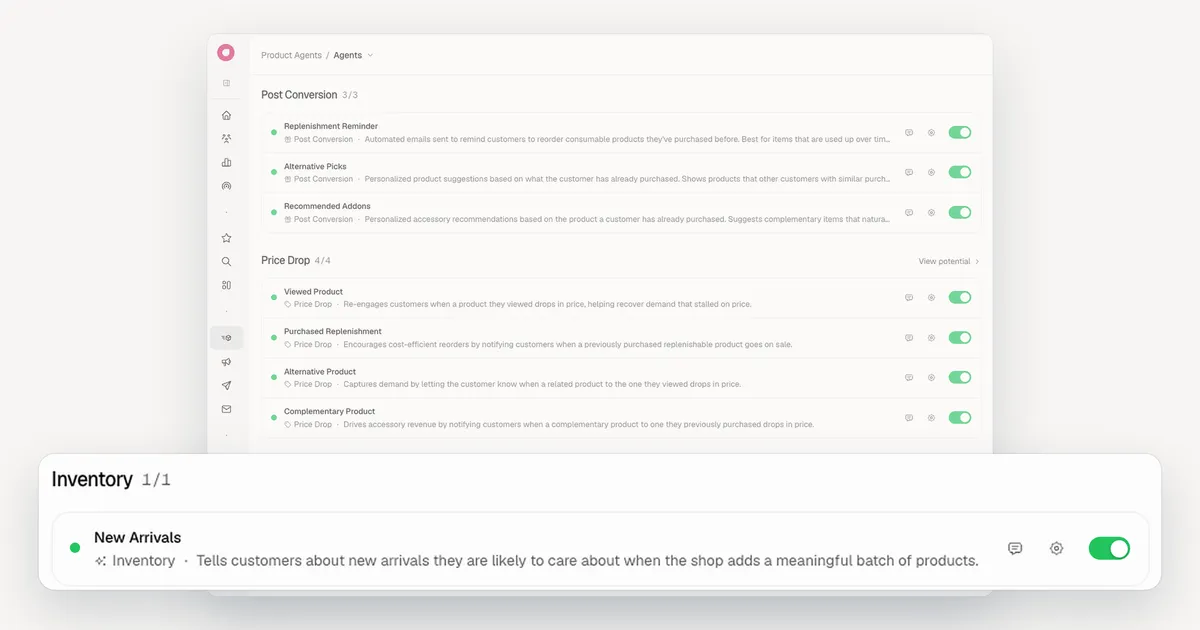
![The Product Agents dashboard, with the New Arrivals agent switched on in the Inventory group below the Post Conversion and Price Drop agents.](/images/blog/2026-11-18-new-arrivals-product-agent/new-arrivals-dashboard.webp)

Read more about [Product Agents](/en/product-agents/), or talk to your Hello Retail contact about [switching it on](/en/demo/).

---

*This content is from the Hello Retail blog. For the full experience with images and formatting, visit [helloretail.com/en/blog/2026-11-18-new-arrivals-product-agent](https://helloretail.com/en/blog/2026-11-18-new-arrivals-product-agent)*