# Price Drop Potential: Know your reach before you drop the price
> The Price Drop Potential dashboard in Hello Retail Product Agents shows which products have the largest reachable audience for a price drop email, with estimated revenue per product, before you change a single price.
**Author:** Ecaterina Capatina
**Published:** May 18, 2026
**Tags:** Product Agents, Price Drop, Email Marketing, Ecommerce Personalization
---
import NavatticEmbed from '../../components/NavatticEmbed.astro';
import FeatureGrid from '../../components/blog/FeatureGrid.astro';
import { NAVATTIC_DEMOS } from '../../config/integrations';
Which products are actually worth discounting right now? Not in theory: in your catalogue, with your customers, at this moment.
The **Price Drop Potential dashboard** in Hello Retail's [Product Agents](/en/product-agents/) answers that question. Before you touch a single price, it shows you how many customers a price drop email would reach for any given product, and what revenue that drop could realistically generate.
## So what is Price Drop Potential?
When a product's price drops on your store, the Price Drop Agents automatically email customers who have shown interest, but also those who already purchased a consumable, or viewed something similar. Price Drop Potential is the dashboard that tells you, in advance, how big that audience is for any given product and what potential revenue a price drop could generate.
## What it actually shows you
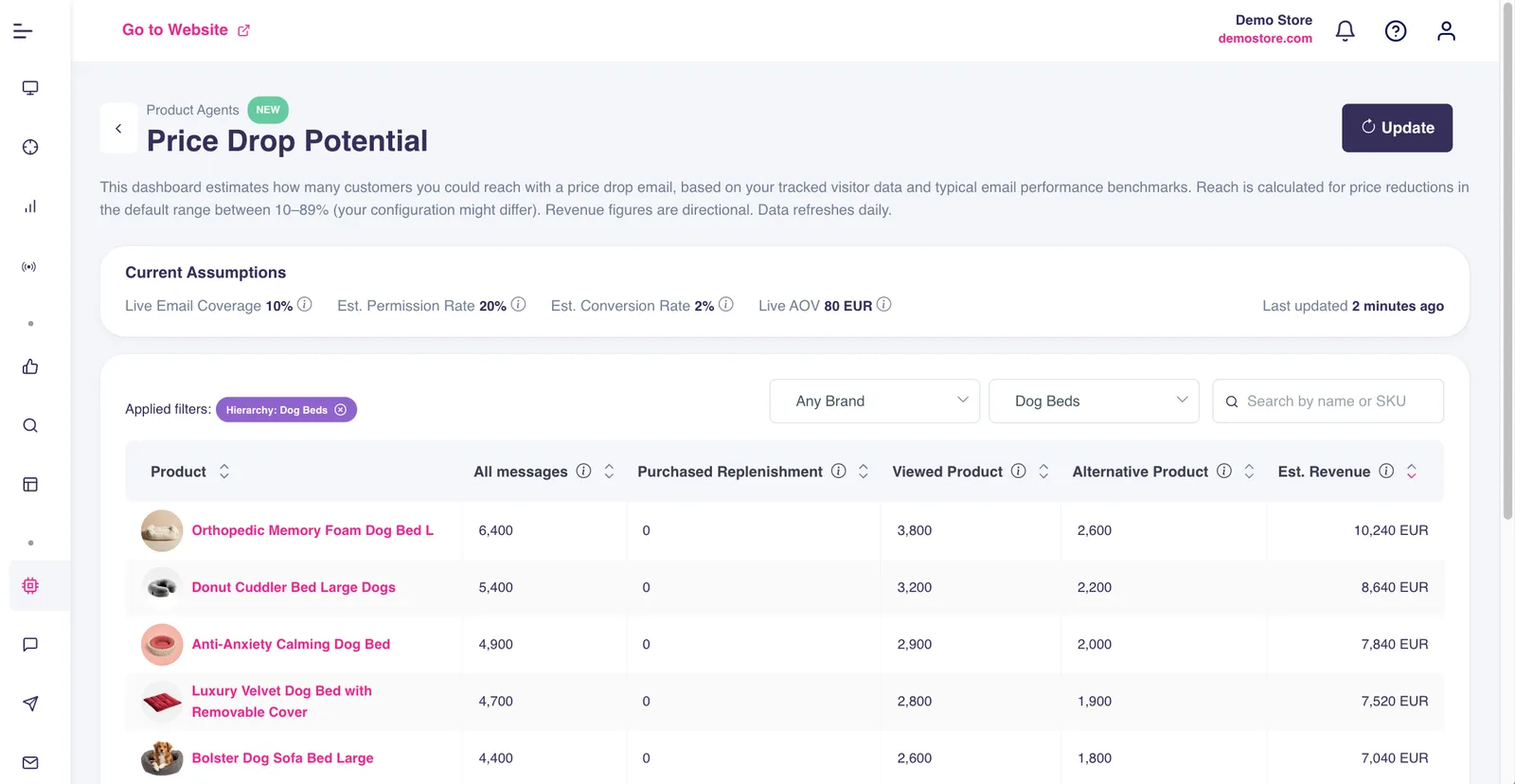
The dashboard ranks your most popular products by how many customers you could reach with a price drop email. Each product is broken down across three audiences, one for each of the three Price Drop agents:
- **Viewed Product.** Visitors who looked at this product and left without purchasing.
- **Purchased Replenishment.** Previous buyers who could be ready to buy again (best for consumables).
- **Alternative Product.** Shoppers browsing similar items who might switch if the price moves.
The product at the top of that list is where a discount does the most work. You start with the highest-reach opportunity in the catalogue.
Next to the reach figures, each product shows an **Estimated Revenue** figure. A directional planning signal, not a guarantee. Use it to weigh whether acting on a product is worth it and to compare options against each other.
## See the dashboard in action
*Filter by brand, sort by reach, and explore how the Price Drop Potential dashboard surfaces opportunities in your catalogue.*
## The numbers are grounded in your data
The figures are built from four inputs shown right at the top of the dashboard. Two are pulled live from your store data. The other two use baselines, one of them specific to Price Drop email performance rather than a generic ecommerce average.
| Input | What it measures | Source |
|---|---|---|
| Email coverage | Share of visitors Hello Retail can identify by email | Your data, last 180 days of tracking |
| Permission rate | Share of identified visitors who gave marketing consent | Estimate, industry baseline (consent lives in your email platform, not in Hello Retail) |
| Conversion rate | How often a Price Drop email leads to a purchase | Estimate, typical Price Drop email performance, not a generic ecommerce average |
| Average order value | Potential revenue per converted email | Your data, recent transactions |
All four inputs are shown at the top of the dashboard so you always know what is feeding the calculation. Put together, the estimated revenue figures reflect your store's reality as closely as possible. Think of them as directional: if product A shows three times the estimated revenue of product B, that gap is meaningful, even if the exact number is not a guarantee.
And whenever a fresh calculation is needed, hitting Update triggers a recalculation of reach and revenue estimates on demand.
## Three ways to use it
{/*
TwentyThree colleague walkthrough goes here once recorded.
Component: TwentyThreeEmbed (clean/helloretail-website/src/components/TwentyThreeEmbed.astro)
Section heading: "## Watch the walkthrough"
Bump updatedDate when the video is added.
*/}
## What it won't do
The dashboard does not change your prices. It does not send anything. It does not schedule anything. It just shows you where the opportunity is, so when you do run a promotion, you are doing it with real insight behind it.
Emails only fire when an actual price drop occurs on your store and your Price Drop agents are active. The dashboard is purely for planning.
## If you have Product Agents, this is already in your account
Go to **[Product Agents](/en/product-agents/) > Agents > Price Drop Agents > View Potential** and take a look. Filter by brand, sort by reach, poke around. The data is there, you might as well use it before your next promotion.
If you are not on Product Agents yet and want to find out more, [we are happy to chat](/contact/).
*For setup details and FAQs, check the [Price Drop Potential support article](https://support.helloretail.com/product-agents/price-drop-potential-dashboard/).*
---
*This content is from the Hello Retail blog. For the full experience with images and formatting, visit [helloretail.com/en/blog/2026-05-18-price-drop-potential-dashboard](https://helloretail.com/en/blog/2026-05-18-price-drop-potential-dashboard)*