# What's new in Product Agents: more control, better testing, and smarter emails
> New in Product Agents: Price Drop dashboard, test emails, message preview, channel limits, and smarter AI copy.
**Author:** Ecaterina Capatina
**Published:** April 27, 2026
**Tags:** Product Agents, Product Updates, Email Marketing
---
import Callout from '../../components/blog/Callout.astro';
import ContentCard from '../../components/blog/ContentCard.astro';
import CTA from '../../components/blog/CTA.astro';
import FeatureGrid from '../../components/blog/FeatureGrid.astro';
import VideoEmbed from '../../components/VideoEmbed.astro';
*Since launching Product Agents, we've been listening closely to how you use them — what works, what's missing, and where things could be smoother. This release is the result of that. It's not a reinvention; it's a meaningful step forward in how you test, monitor, and control your Product Agent setup.*
*Here's everything that's new.*
**What's new**
- [**Price Drop Potential dashboard**](#the-price-drop-potential-dashboard) — see the email revenue potential of any price drop before you make it.
- [**One-click test emails**](#a-better-way-to-test-your-emails) — test any agent against its current config, including unsaved changes.
- [**Email Previews**](#see-what-your-emails-actually-say--with-email-previews) — a Preview tab that shows the AI-generated content of any sent message.
- [**Custom message limits + Auto-Overage**](#more-control-over-sending-and-billing) — per-channel frequency caps and uninterrupted sending when credits run out.
- [**Sharper AI email copy**](#improved-ai-generated-email-content) — better subject lines, headlines, product descriptions, and calls to action, applied automatically.
## The Price Drop Potential dashboard
At a glance
- See the email reach of any price drop before you make it
- It's built on your customers' browsing activity your Price Drop agents already use
- Makes discount planning data-driven, not gut-driven
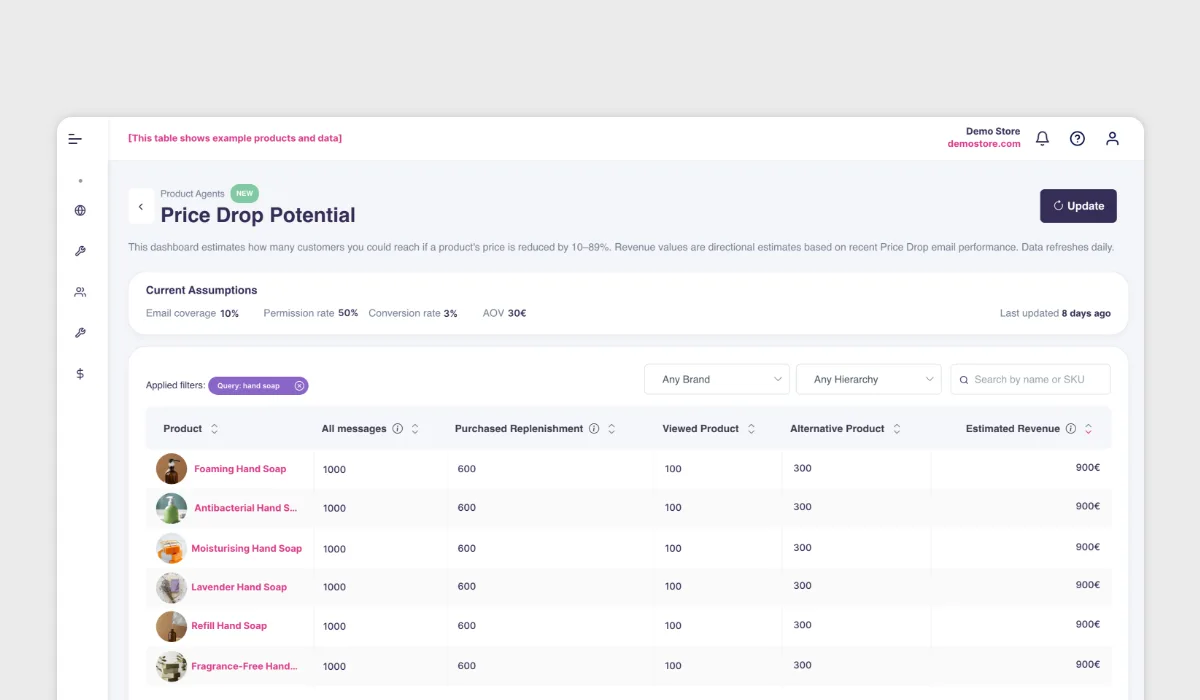
The Price Drop Potential dashboard is a new tool that shows you the email revenue potential of dropping a product's price, before you actually do it.
Pick any product in your catalog, and the dashboard tells you how many customers would be notified if you reduced the price — and what the estimated revenue from those emails looks like. The numbers come from the same intent data your Price Drop agents already act on: which customers viewed the product, how recently, and how many are showing buying signals right now.
For ecommerce teams planning promotions, the dashboard gives you an interactive overview of your entire catalog — so you can quickly spot where a price drop would have the most impact and make decisions based on actual customer demand rather than guesswork.
Note: the dashboard is informative only — you can't drop prices directly from it. Use it to plan, then make the price changes in your store as you normally would.
**What this means for you:** Before you run a promotion, you can scan your catalog and see which products have the largest ready audience. Some products will surprise you — items with modest sales volume but a large pool of interested, price-sensitive customers who are just waiting for the right moment.
## A better way to test your emails
At a glance
- Send a test email with one click, just like in your ESP
- Test any agent against its current config, including unsaved changes
- No credits used, no customers contacted
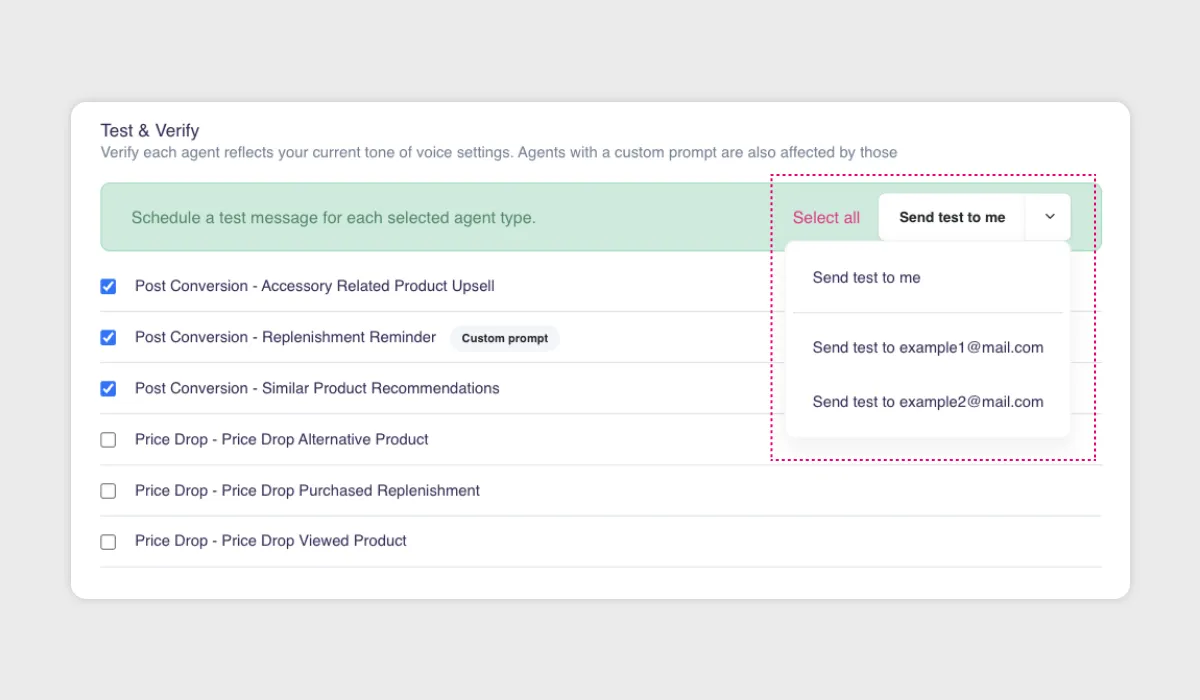
We've made it easy to test your Product Agent emails — the same way you'd send a test email in Klaviyo or any other ESP, but for AI-generated content. Just click a button, pick a test recipient, and see the result. Test sends are available from two places in the product:
**From Tone of Voice settings**, you can send a test to see how your tone and language choices affect the generated output. This is especially useful when you're dialing in a new voice or adjusting how formal or casual your emails sound.
**From the agent popup, next to custom prompts**, you can send a test for a specific agent based on its current configuration — including changes you haven't saved yet. That last part matters: you can tweak a prompt, fire off a test, and see the result before committing to anything.
When you send a test, you pick a recipient from the list of test emails you've defined in your Product Agent settings. No real customers are contacted, no credits are consumed, and the process runs in the background — you'll see a success message once it's sent. You can also watch the status update live in the message UI. In the message overview, test messages are now clearly marked so they're easy to distinguish from live sends.
**What this means for you:** Testing is no longer something you have to think twice about. You can iterate on tone, prompts, and agent behavior quickly and confidently, without worrying about burning credits or accidentally reaching a customer.
## See what your emails actually say — with Email Previews
At a glance
- New Preview tab sits alongside Simple and JSON views in sent messages
- Shows AI-generated content — headline, body, product picks
- Content only, not template styling
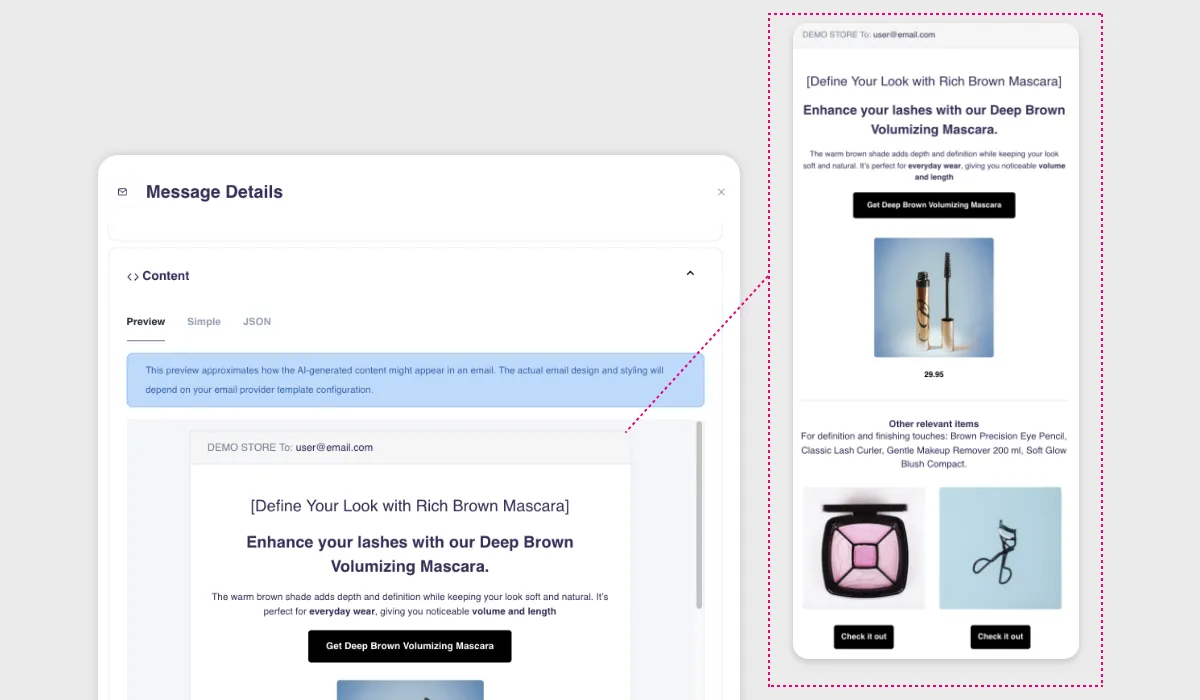
We've added a new **Preview tab** to the sent messages view, right next to the existing "Simple" and "JSON" views. It gives you a quick, readable look at the AI-generated content that went out in each email — the headline, the body text, the product recommendations.
A quick note on what this is and isn't: the Preview tab shows you the content that Product Agents composed for a specific email. It doesn't render your Klaviyo template styling. Think of it as a content inspection tool, not a full email mockup.
**Why it matters:** When you're running multiple agents and sending hundreds or thousands of emails, it's useful to be able to spot-check what's actually being said.
## More control over sending and billing
At a glance
- Set custom message frequency limits per channel
- Auto-Overage keeps sending running when credits run out
### Message limits you can customize
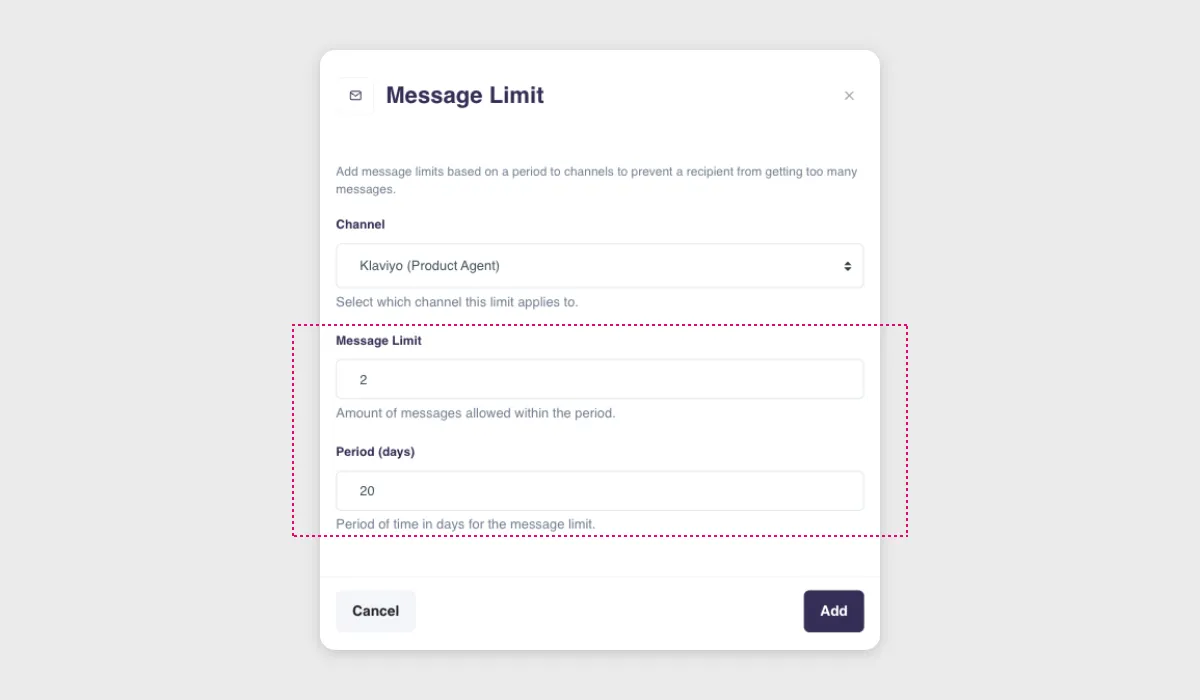
Product Agents have always enforced a hard cap of one message per recipient per day. That rule stays — it can't be removed. But now you can go further.
In Settings, you'll find a new **Message Limits** feature that lets you configure custom rate limits on a per-channel basis. If one email per day still feels like too much for your audience, you can set limits like one message per week, or three messages per month — whatever fits your sending philosophy.
This is especially useful if you're running multiple agents simultaneously and want to make sure your customers aren't hearing from you too often, even if several agents have something relevant to say.
### Auto-Overage for uninterrupted sending
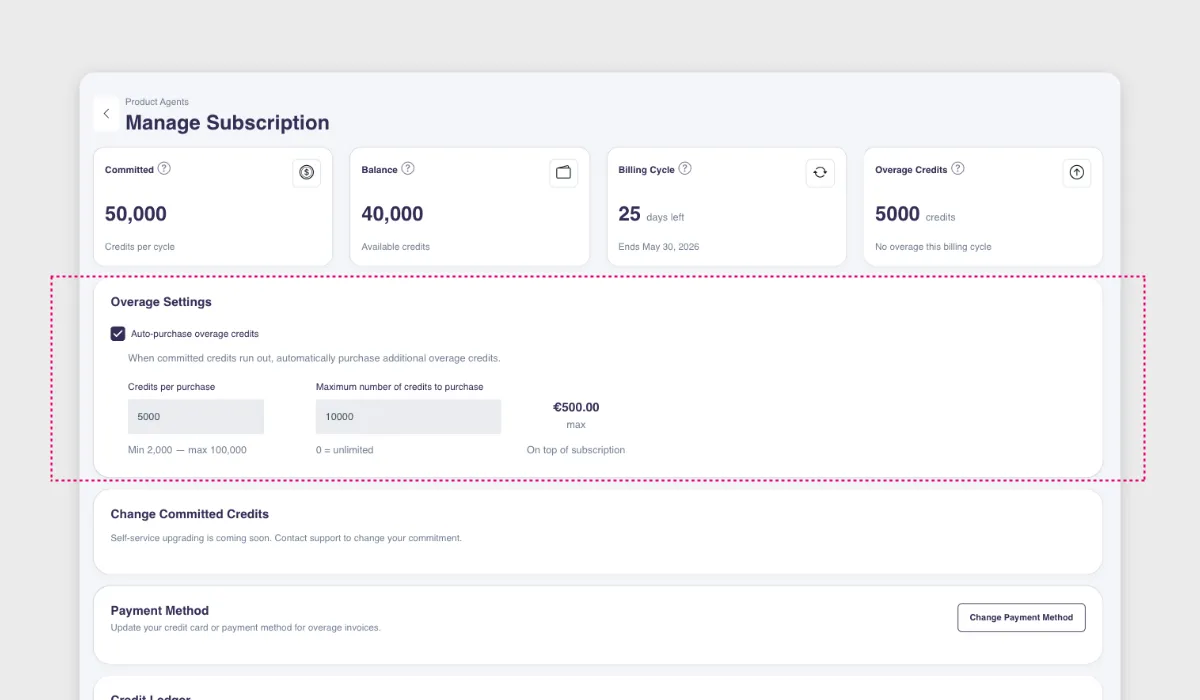
If your credits run out mid-cycle, sending used to pause until the next billing period or until you manually purchased more. Now you can opt in to **Auto-Overage** — when your balance hits zero, additional credits are purchased automatically so your agents keep running without interruption.
You control how it works: set the number of credits per purchase and a maximum cap per billing cycle so there are no surprises. The configuration is accessible only to company owners, and every change is logged in the Activities Log for full transparency.
## Improved AI-generated email content
At a glance
- Sharper subject lines, headlines, and calls to action
- More precise product descriptions
- No setup needed — applies automatically to all agents
We've updated the prompts that power Product Agent email copy. The AI-generated text — headlines, product descriptions, and calls to action — is now more precise and actionable. This is part of our ongoing work to continuously improve the language and messaging quality, so every email that goes out feels sharper and more relevant.
**What this means for you:** Nothing to configure. Your agents are already sending sharper subject lines, tighter product descriptions, and clearer calls to action — across every email they send.
## What's coming next
We're already working on the next round of updates for Product Agents. Here's a taste of what's ahead.
---
*These updates are live now. If you're already using Product Agents, they're available in your account. If you're curious about what Product Agents can do for your store, we'll walk you through it with your own products and data.*
---
*This content is from the Hello Retail blog. For the full experience with images and formatting, visit [helloretail.com/en/blog/2026-04-27-whats-new-in-product-agents](https://helloretail.com/en/blog/2026-04-27-whats-new-in-product-agents)*