# Price drop alerts with Klaviyo: turning price changes into revenue
> Price drops happen constantly in your catalog. Alerting the right customers at the right time turns markdowns into revenue instead of margin erosion.
**Author:** Ecaterina Capatina
**Published:** March 25, 2026
**Tags:** Solutions, Industry Tips
---
# Price drop alerts with Klaviyo: turning price changes into revenue
A customer visits your store, browses a pair of leather boots priced at $189, spends three minutes on the product page, and leaves. Two weeks later, those boots go on sale for $149.
What happens next depends entirely on your email infrastructure.
In some stores: nothing. The customer never finds out. They've moved on to a competitor or forgotten about the boots entirely. The price cut either attracts someone who would have paid full price anyway — costing you margin for nothing — or it goes unnoticed and the boots sit in inventory.
In stores with price drop alerts: the customer receives an email within hours. "Those boots you looked at? They're $40 off." The customer clicks, buys, and feels smart about it. The markdown converts a browser into a buyer.
Same price reduction. Dramatically different outcome.
## Why price drop alerts work
Price drop alerts have some of the highest conversion rates of any email type. The reason is straightforward: every element of the email is aligned.
- **Timing:** The customer showed interest. The price just changed. The email arrives when the information is fresh and actionable.
- **Relevance:** The product is one the customer specifically viewed or wishlisted. No guessing involved.
- **Value proposition:** The email communicates genuine value — "this thing you wanted costs less now."
- **Low friction:** One click to the product page. One click to buy. No browsing, no searching, no discovery required.
This isn't marketing. It's a service. Customers appreciate price drop notifications because the emails solve a real problem: they wanted something but the price was a barrier. The barrier just dropped, and you told them about it.
## How price drop alerts work in Klaviyo
Klaviyo includes a native price drop flow trigger that works with major ecommerce platforms like Shopify, BigCommerce, WooCommerce, and Magento, as well as custom catalog feeds. It picks up price decreases and emails customers who previously viewed or started checkout with the discounted product. It also handles the basics well: suppressing out-of-stock items, filtering out past purchasers, and only triggering for in-stock products.
For many stores, this native flow is a solid starting point. But it has limits. Klaviyo's price drop trigger only connects a specific product to the customers who viewed that exact product — it doesn't understand product relationships, can't distinguish replenishable products from one-time purchases.
## How Product Agents improve price drop alert outcomes
[Product Agents](/en/product-agents/) layer on top of Klaviyo's infrastructure to close those gaps. The workflow:
1. **Price monitoring:** The Product Agent watches your product feed for price decreases. This includes sale pricing, clearance markdowns, and promotional discounts.
2. **Customer matching:** When a price drops, the agent identifies customers who have interacted with that product — viewed it, added it to cart, wishlisted it, or searched for related terms. Unlike Klaviyo's native trigger, it also includes past purchasers of replenishable products and customers who viewed similar alternatives.
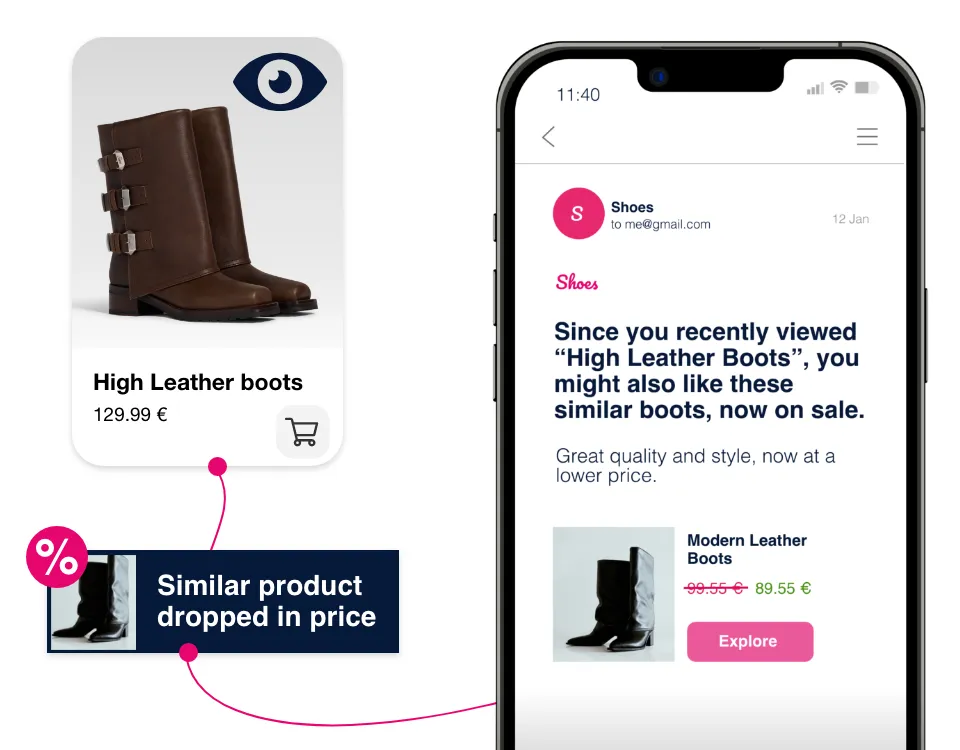 3. **Flow triggering:** The agent triggers a Klaviyo event for each matched customer, containing the product data, old price, new price, and discount amount — enriched with price sensitivity data so you can tailor the message by customer segment.
4. **Email delivery:** Klaviyo sends the price drop alert email using the triggered event data.
The entire process happens automatically. No merchandising team involvement. No manual campaign creation. Prices drop, the right emails reach the right customers.
## Building effective price drop alert emails
The email itself should be simple. The value proposition is clear — don't bury it under creative.
### Subject line
Direct and specific. "The [product name] you viewed just dropped to $149" outperforms "Great savings inside!" by a wide margin. The customer should know exactly what the email is about before opening it.
### Email body
- **Product image** — the specific product they viewed, prominently displayed
- **Price comparison** — old price crossed out, new price in bold, savings amount or percentage
- **Direct CTA** — "Shop now" or "Get it at $149" linking directly to the product page
- **Urgency cues** — "Sale prices may change" or "Limited stock at this price" (only if genuinely true)
- **One alternative** — a single similar product at the sale price, in case the original isn't quite right
What to avoid:
- Don't pack the email with other products, promotions, or newsletter content. The price drop is the message. Let it breathe.
- Don't send price drop alerts for tiny reductions. A $2 discount on a $50 product isn't worth an email. Set a minimum threshold — 10-15% off or $10+ savings, whichever is greater.
- Don't alert for products the customer already purchased — unless they're replenishable (more on this in the advanced strategies section below).
## Timing and frequency
### When to send
Send within 4-12 hours of the price change. Faster is better — the customer who browsed yesterday is more likely to buy than the customer who browsed three weeks ago. But don't send at 3 AM. Queue the alert for the customer's local daytime hours.
### Frequency caps
A customer who browses 20 products shouldn't get 20 price drop emails when a site-wide sale launches. Set limits:
- Maximum 1 price drop alert per customer per day
- Maximum 3 per customer per week
- Prioritize alerts by: recency of customer interaction, discount depth, and product value
### Interaction-based filtering
Not all product views are equal. A customer who spent 2 minutes on a product page has stronger intent than one who bounced in 5 seconds. Filter your price drop alert audience by engagement depth:
- Viewed for 15+ seconds (minimum threshold)
- Added to cart (highest intent — prioritize)
- Wishlisted (explicit interest signal)
- Searched for the product or category (moderate intent)
## Advanced strategies
### Tiered price drop sequences
Instead of sending one alert, build a sequence:
- **Alert 1:** When the product first drops in price. "The leather boots you viewed are now $149."
- **Alert 2:** If the customer doesn't convert within 48 hours and the price drops further. "Now $129 — the price is still falling."
- **Alert 3:** When the product reaches its lowest planned price. "This is the lowest we've seen the leather boots — $109."
This approach works especially well during seasonal clearance when prices decrease progressively.
### Category expansion
A customer who viewed a specific product is also interested in similar products at the sale price. If the leather boots they viewed don't go on sale, but similar boots from a different brand do — that's still a relevant alert.
This requires [product intelligence](/en/product-intelligence/) to understand which products are genuine alternatives, not just category neighbors. A pair of hiking boots isn't a substitute for fashion leather boots, even though they're both "boots."
### Replenishable product alerts
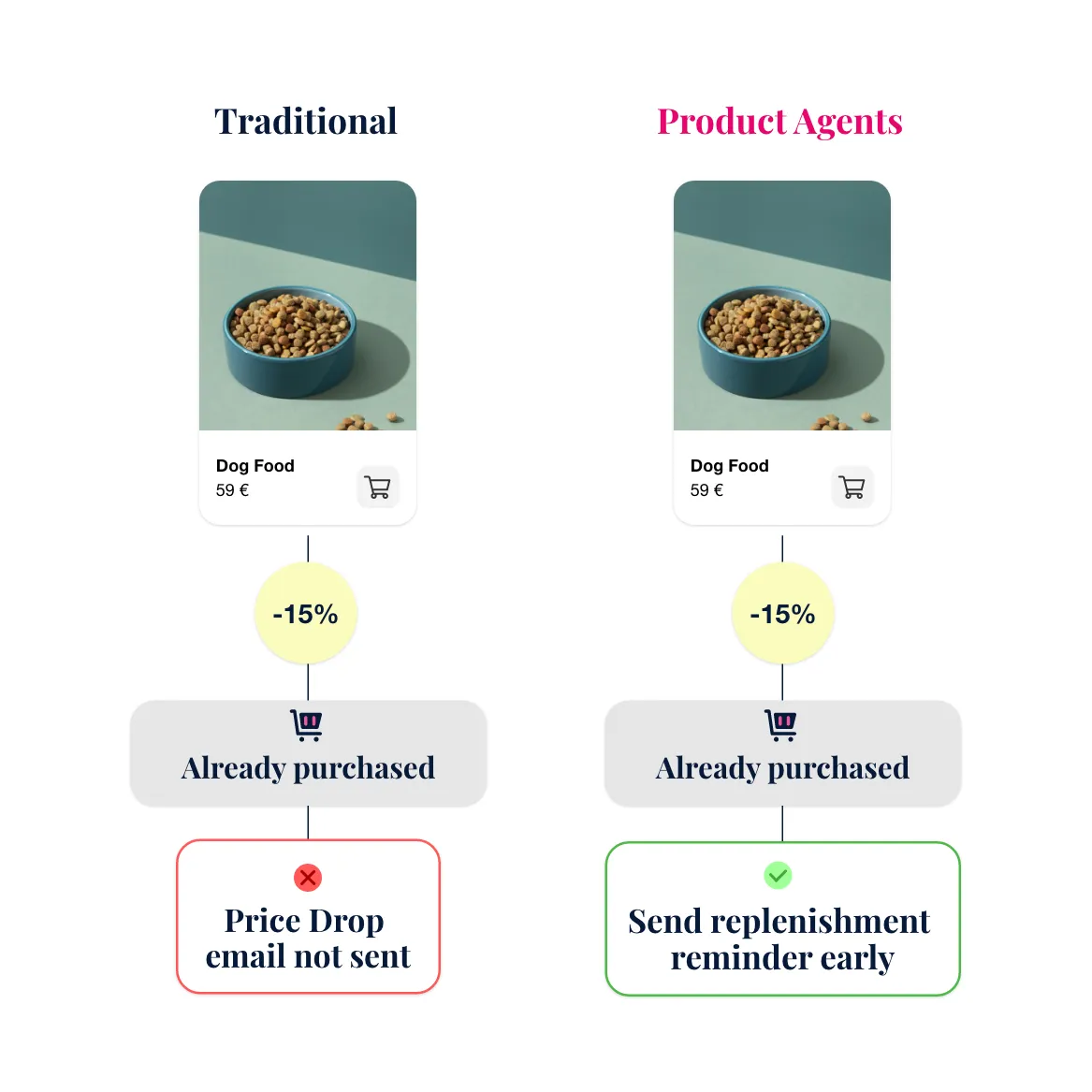
Standard advice says don't send price drop alerts for products a customer already bought. If someone purchased those leather boots last month, emailing them about a price drop is just rubbing salt in the wound.
But replenishable products are a different story. Shampoo, coffee beans, vitamins, pet food — these are things customers buy again and again. A price drop on a replenishable product isn't annoying, it's useful. It's an invitation to stock up at a better price.
The problem is that Klaviyo doesn't distinguish between a one-time purchase like boots and a recurring purchase like shampoo. Its default logic filters out past purchasers across the board, which means replenishable products get caught in the same suppression rules as everything else.
[Product Agents](/en/product-agents/) solve this by identifying which products in your catalog are replenishable. When the Price Drop Agent detects a price decrease on a replenishable item, it includes past purchasers in the Klaviyo event — not just browsers.
This turns a standard suppression rule into a smarter one: suppress past purchasers for one-time products, but re-engage them for replenishable ones. It's a meaningful distinction that most email setups miss entirely.
3. **Flow triggering:** The agent triggers a Klaviyo event for each matched customer, containing the product data, old price, new price, and discount amount — enriched with price sensitivity data so you can tailor the message by customer segment.
4. **Email delivery:** Klaviyo sends the price drop alert email using the triggered event data.
The entire process happens automatically. No merchandising team involvement. No manual campaign creation. Prices drop, the right emails reach the right customers.
## Building effective price drop alert emails
The email itself should be simple. The value proposition is clear — don't bury it under creative.
### Subject line
Direct and specific. "The [product name] you viewed just dropped to $149" outperforms "Great savings inside!" by a wide margin. The customer should know exactly what the email is about before opening it.
### Email body
- **Product image** — the specific product they viewed, prominently displayed
- **Price comparison** — old price crossed out, new price in bold, savings amount or percentage
- **Direct CTA** — "Shop now" or "Get it at $149" linking directly to the product page
- **Urgency cues** — "Sale prices may change" or "Limited stock at this price" (only if genuinely true)
- **One alternative** — a single similar product at the sale price, in case the original isn't quite right
What to avoid:
- Don't pack the email with other products, promotions, or newsletter content. The price drop is the message. Let it breathe.
- Don't send price drop alerts for tiny reductions. A $2 discount on a $50 product isn't worth an email. Set a minimum threshold — 10-15% off or $10+ savings, whichever is greater.
- Don't alert for products the customer already purchased — unless they're replenishable (more on this in the advanced strategies section below).
## Timing and frequency
### When to send
Send within 4-12 hours of the price change. Faster is better — the customer who browsed yesterday is more likely to buy than the customer who browsed three weeks ago. But don't send at 3 AM. Queue the alert for the customer's local daytime hours.
### Frequency caps
A customer who browses 20 products shouldn't get 20 price drop emails when a site-wide sale launches. Set limits:
- Maximum 1 price drop alert per customer per day
- Maximum 3 per customer per week
- Prioritize alerts by: recency of customer interaction, discount depth, and product value
### Interaction-based filtering
Not all product views are equal. A customer who spent 2 minutes on a product page has stronger intent than one who bounced in 5 seconds. Filter your price drop alert audience by engagement depth:
- Viewed for 15+ seconds (minimum threshold)
- Added to cart (highest intent — prioritize)
- Wishlisted (explicit interest signal)
- Searched for the product or category (moderate intent)
## Advanced strategies
### Tiered price drop sequences
Instead of sending one alert, build a sequence:
- **Alert 1:** When the product first drops in price. "The leather boots you viewed are now $149."
- **Alert 2:** If the customer doesn't convert within 48 hours and the price drops further. "Now $129 — the price is still falling."
- **Alert 3:** When the product reaches its lowest planned price. "This is the lowest we've seen the leather boots — $109."
This approach works especially well during seasonal clearance when prices decrease progressively.
### Category expansion
A customer who viewed a specific product is also interested in similar products at the sale price. If the leather boots they viewed don't go on sale, but similar boots from a different brand do — that's still a relevant alert.
This requires [product intelligence](/en/product-intelligence/) to understand which products are genuine alternatives, not just category neighbors. A pair of hiking boots isn't a substitute for fashion leather boots, even though they're both "boots."
### Replenishable product alerts
Standard advice says don't send price drop alerts for products a customer already bought. If someone purchased those leather boots last month, emailing them about a price drop is just rubbing salt in the wound.
But replenishable products are a different story. Shampoo, coffee beans, vitamins, pet food — these are things customers buy again and again. A price drop on a replenishable product isn't annoying, it's useful. It's an invitation to stock up at a better price.
The problem is that Klaviyo doesn't distinguish between a one-time purchase like boots and a recurring purchase like shampoo. Its default logic filters out past purchasers across the board, which means replenishable products get caught in the same suppression rules as everything else.
[Product Agents](/en/product-agents/) solve this by identifying which products in your catalog are replenishable. When the Price Drop Agent detects a price decrease on a replenishable item, it includes past purchasers in the Klaviyo event — not just browsers.
This turns a standard suppression rule into a smarter one: suppress past purchasers for one-time products, but re-engage them for replenishable ones. It's a meaningful distinction that most email setups miss entirely.
 ## How this connects to Hello Retail
Hello Retail's [Product Agents](/en/product-agents/) include a dedicated Price Drop Agent that monitors the product feed, matches price changes to customer behavior, and triggers Klaviyo events automatically.
The agent uses the [Product Intelligence](/en/product-intelligence/) engine to understand product relationships, which enables the category expansion strategy — alerting customers not just about specific products they viewed but about relevant alternatives at reduced prices.
For stores building out their [full triggered email program](/en/blog/2026-02-21-triggered-emails-ecommerce-guide/), price drop alerts complement [abandoned cart](/en/blog/2026-02-21-types-of-triggered-emails/) and [replenishment reminders](/en/blog/2026-02-21-replenishment-reminders-complete-guide/) to create a comprehensive behavioral email system within Klaviyo.
Combined with the broader strategy of [improving Klaviyo email performance](/en/blog/2026-02-21-improve-klaviyo-email-performance/), price drop alerts represent one of the highest-ROI additions to an existing email automation program.
## Key takeaways
- Price drop alerts convert browsers into buyers by delivering genuine value — the product they wanted at a lower price
- Klaviyo's native price drop flow handles the basics well, but Product Agents extend it with replenishable product awareness, category expansion, and price sensitivity segmentation
- Keep the email simple: product image, price comparison, direct CTA. Don't dilute the message.
- Set frequency caps and engagement thresholds to prevent alert fatigue — prioritize high-intent interactions and meaningful discounts
---
*This content is from the Hello Retail blog. For the full experience with images and formatting, visit [helloretail.com/en/blog/2026-02-21-price-drop-alerts-klaviyo](https://helloretail.com/en/blog/2026-02-21-price-drop-alerts-klaviyo)*
## How this connects to Hello Retail
Hello Retail's [Product Agents](/en/product-agents/) include a dedicated Price Drop Agent that monitors the product feed, matches price changes to customer behavior, and triggers Klaviyo events automatically.
The agent uses the [Product Intelligence](/en/product-intelligence/) engine to understand product relationships, which enables the category expansion strategy — alerting customers not just about specific products they viewed but about relevant alternatives at reduced prices.
For stores building out their [full triggered email program](/en/blog/2026-02-21-triggered-emails-ecommerce-guide/), price drop alerts complement [abandoned cart](/en/blog/2026-02-21-types-of-triggered-emails/) and [replenishment reminders](/en/blog/2026-02-21-replenishment-reminders-complete-guide/) to create a comprehensive behavioral email system within Klaviyo.
Combined with the broader strategy of [improving Klaviyo email performance](/en/blog/2026-02-21-improve-klaviyo-email-performance/), price drop alerts represent one of the highest-ROI additions to an existing email automation program.
## Key takeaways
- Price drop alerts convert browsers into buyers by delivering genuine value — the product they wanted at a lower price
- Klaviyo's native price drop flow handles the basics well, but Product Agents extend it with replenishable product awareness, category expansion, and price sensitivity segmentation
- Keep the email simple: product image, price comparison, direct CTA. Don't dilute the message.
- Set frequency caps and engagement thresholds to prevent alert fatigue — prioritize high-intent interactions and meaningful discounts
---
*This content is from the Hello Retail blog. For the full experience with images and formatting, visit [helloretail.com/en/blog/2026-02-21-price-drop-alerts-klaviyo](https://helloretail.com/en/blog/2026-02-21-price-drop-alerts-klaviyo)*